
Overview • Features • Motivation • Workflow • Quick Start • Configuration
Rules • Registry • Inspirations • Contributing • License


Define what "good code" means for your project. TScanner enforces your patterns in real-time in the code editor, blocks violations in PRs, and runs in CI. 38 ready-to-use rules + custom rules via regex, scripts, or AI.
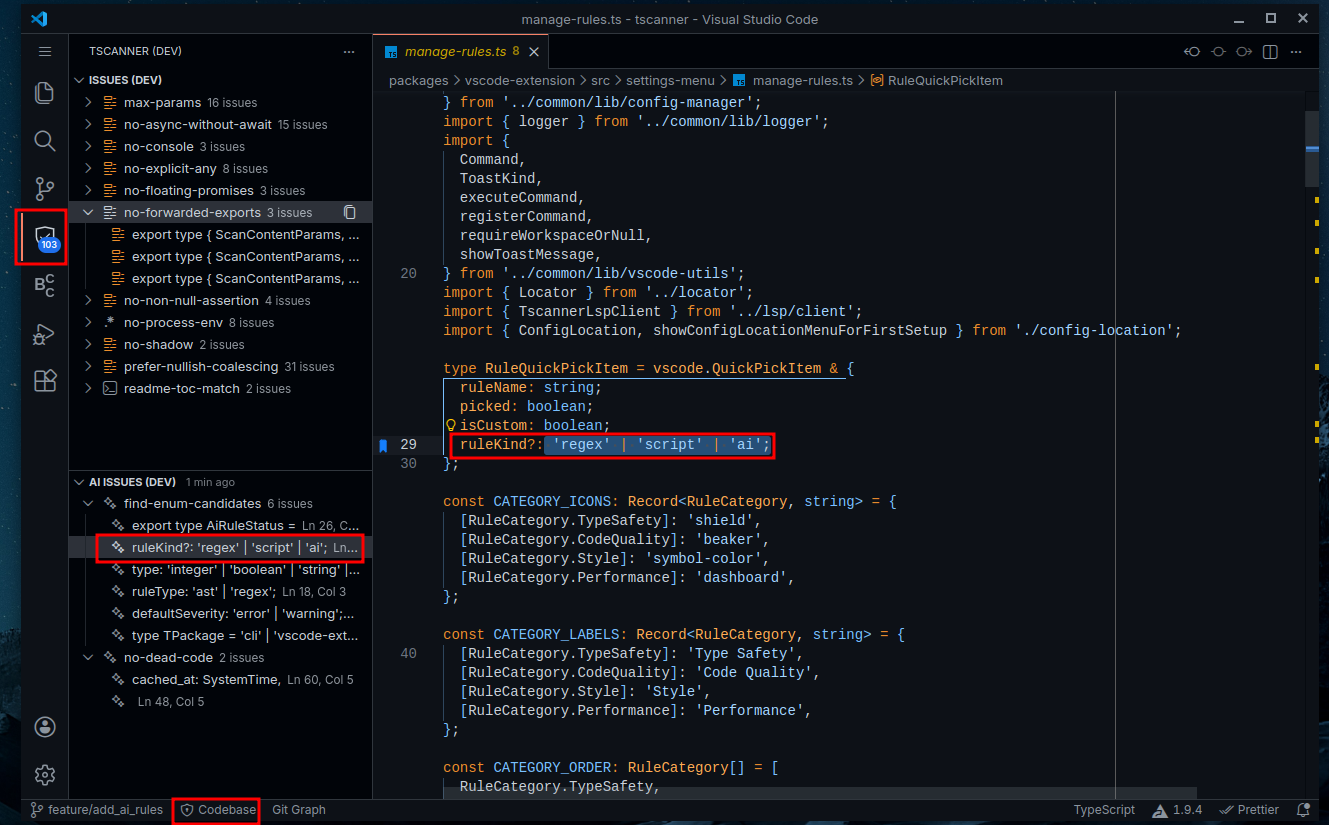
issues detected in real time in the code editor
Other images
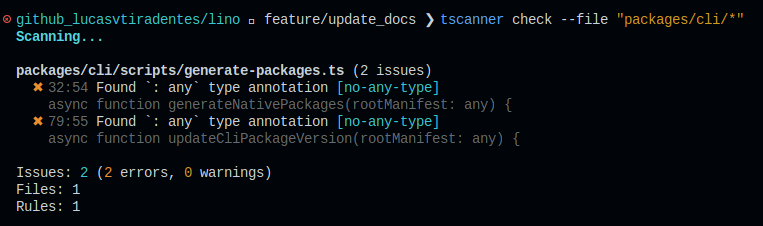
scanning the codebase via CLI
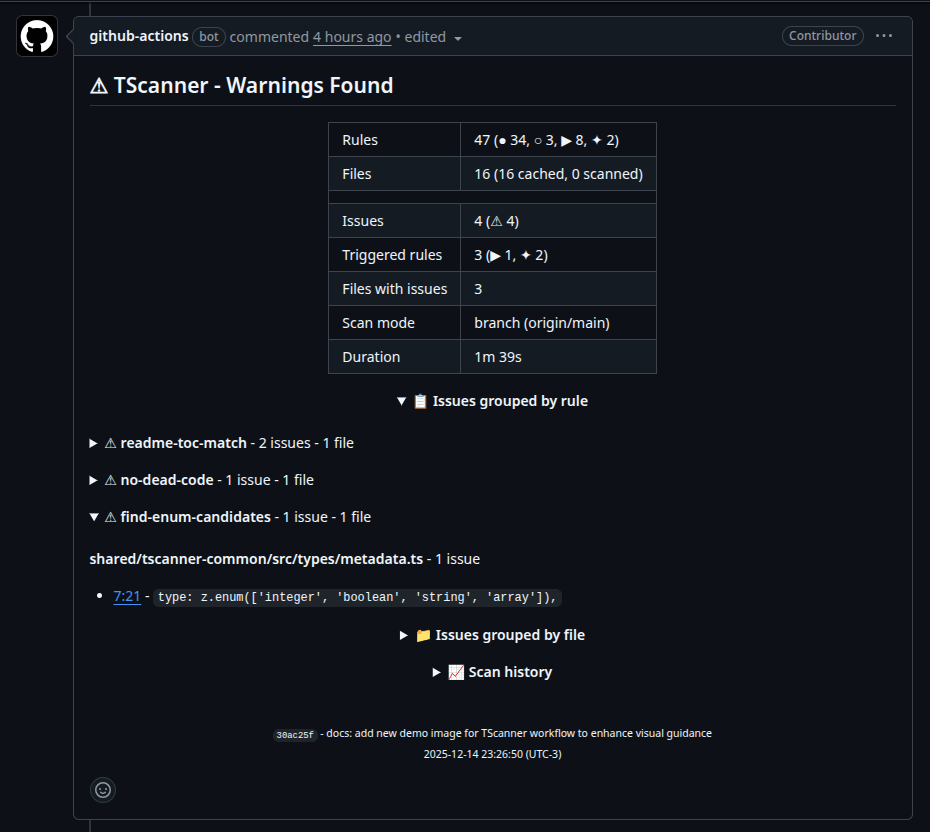
issues detected in the latest commit pushed to a PR
Ways to use TScanner
| Package | Description |
|---|---|
| Live code issues in sidebar with multiple scan modes and AI clipboard export to fix them | |
| Fast terminal scanning with pre-commit hook integration | |
| CICD integration with analysis summary attached to PR comments |




Use cases for this project
- Project Consistency - Enforce import styles, naming conventions, and code organization rules
- PR Quality Gates - Auto-comment violations before merge so reviewers focus on logic
- AI Code Validation - Real-time feedback on AI-generated code before accepting
- Flexible Customization - Built-in rules + custom scripts and AI rules for complex logic
- Your Rules, Enforced - 38 built-in checks + define your own with regex, scripts, or AI
- Community Rules - Install pre-built rules from registry or share your own with the world
- See Issues Instantly - Real-time feedback in code editor as you type, no manual scan needed
- Copy for AI - Export issues to clipboard, paste into chat for bulk fixes
- Catch Before Merge - PR comments show violations with clickable links to exact lines
- One Comment, Updated - No spam, same comment updated on each push
- Multiple Scan Modes - Whole codebase, branch changes, uncommitted changes, or staged changes
- Sub-second Scans - Rust engine processes hundreds of files in <1s, with smart caching
- Not a Blocker - Issues are warnings by default; set as errors to fail CI/lint-staged
AI generates code fast, but it doesn't know your project's conventions, preferred patterns, or forbidden shortcuts. You end up reviewing the same issues over and over.
TScanner lets you define those rules once. Every AI-generated file, every PR, every save: automatically checked against your standards.
Vision: Go fast with AI and know exactly what to fix before shipping. Detect bad patterns while reviewing code? Ask AI to create regex, script, or AI rules to catch it forever. Use the VSCode extension's "Copy Issues" button to get a ready-to-paste prompt and let your favorite AI tool fix everything. Before merging, see all issues at a glance in a PR comment from your CI/CD: nothing blocks by default, you decide what matters.
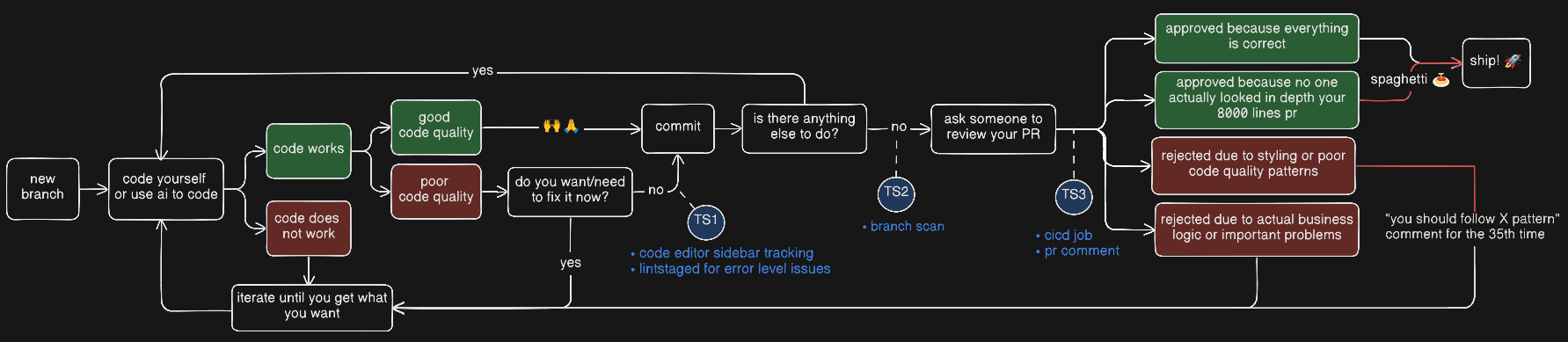
How TScanner fits into the average coding workflow
How does TScanner prevent issues from reaching production?
- Code Editor: See issues in real-time while coding. Add to lint-staged to prevent committing errors.
- Before PR: Check all issues in your branch compared to origin/main and fix them before opening a PR.
- CI/CD: Every push to a PR is checked automatically. Get a single comment with clickable links to the exact lines.
Why does this matter?
- Go fast with confidence: Know exactly what issues to fix before committing or merging.
- Zero rejected PRs: Over time, eliminate PR rejections due to styling or poor code quality patterns.
- AI-powered quality: Use AI rules to detect patterns that traditional linters miss, and let AI help fix AI-generated code.
- Your job: Observe code patterns to enforce/avoid and add TScanner rules for that.
How TScanner maintains its own codebase?
We use TScanner to maintain this very codebase. Here's our setup:
Built-in rules (34 enabled): Standard code quality checks like no-explicit-any, prefer-const, no-console, etc.
Regex rules (3):
no-rust-deprecated: Block#[allow(deprecated)]in Rust codeno-rust-dead-code: Block#[allow(dead_code)]- remove unused code insteadno-process-env: Prevent directprocess.envaccess
Script rules (8):
types-parity-match: Ensure TypeScript and Rust shared types are in syncconfig-schema-match: Keep Rust config and TypeScript schema alignedcli-builder-match: CLI builder must cover all CLI check flagsaction-zod-match: GitHub Action inputs must match Zod validationreadme-toc-match: README table of contents must match all headingsrust-entry-simple:lib.rsandmod.rsshould only contain module declarationsno-long-files: Files cannot exceed 300 linesno-default-node-imports: Use named imports for Node.js modules
AI rules (2):
no-dead-code: Detect dead code patterns in Rust executorsfind-enum-candidates: Find type unions that could be enums
TIP: Check the
.tscanner/folder to see the full config and script implementations.
How am I using this to improve my code at work?
I basically observe code patterns to enforce/avoid and add custom rules, here are my current rules:
regex rules:
script rules:
"script": {
  "entity-registered-in-typeorm-module": {
    "command": "npx tsx script-rules/entity-registered-in-typeorm-module.ts",
    "message": "Entity must be registered in way-type-orm.module.ts",
    "severity": "error",
    "include": ["api/src/**/*.entity.ts", "api/src/way-type-orm.module.ts"]
  },
  "entity-registered-in-setup-nest": {
    "command": "npx tsx script-rules/entity-registered-in-setup-nest.ts",
    "message": "Entity must be registered in setup-nest.ts for tests",
    "severity": "error",
    "include": ["api/src/**/*.entity.ts", "api/test/helpers/setup-nest.ts"]
  },
  "no-long-files": {
    "command": "npx tsx script-rules/no-long-files.ts",
    "message": "File exceeds 600 lines limit",
    "include": ["**/*.ts"]
  }
}
ai rules:
soon!
Note: my rules at work are not commited to the codebase, so I basically installed tscanner globally and move the .tscanner folder into the .gitignore file
- Install locally
npm install -D tscanner- Initialize configuration
npx tscanner initTIP: Use
npx tscanner init --fullfor a complete config with example regex, script, and AI rules.
After that you can use it in the three modes below:
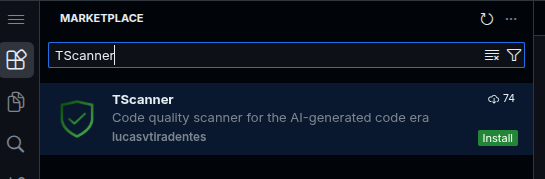
- Install the extension:
| Search "TScanner" in Extensions | Install from marketplace |
|---|---|
 |
 
|
- Click TScanner icon in activity bar
- Issues appear automatically in the sidebar (if any)
- Click any issue to jump to its location
- Check via terminal
# Scan workspace
npx tscanner check

# Scan uncommitted changes (staged + unstaged)
npx tscanner check --uncommitted

# Scan only changed files vs branch
npx tscanner check --branch origin/main- Integrate with lint-staged (optional)
// .lintstagedrc.json
{
  "*": ["npx tscanner check --staged"]
}- Create
.github/workflows/tscanner.yml:
name: Code Quality
on: [pull_request]

jobs:
  tscanner:
    runs-on: ubuntu-latest
    steps:
      - uses: actions/checkout@v4
      - uses: lucasvtiradentes/tscanner-action@v0.1.3
        with:
github-token: ${{ secrets.GITHUB_TOKEN }}- Open a PR to see it in action
To scan your code, you need to set up the rules in the TScanner config folder.
Full configuration
{
  "$schema": "https://unpkg.com/tscanner@latest/schema.json",
  "rules": {
    "builtin": {
      "consistent-return": {},
      "max-function-length": {},
      "max-params": {},
      "no-absolute-imports": {},
      "no-alias-imports": {},
      "no-async-without-await": {},
      "no-console": {},
      "no-constant-condition": {},
      "no-default-export": {},
      "no-duplicate-imports": {},
      "no-dynamic-import": {},
      "no-else-return": {},
      "no-empty-class": {},
      "no-empty-function": {},
      "no-empty-interface": {},
      "no-explicit-any": {},
      "no-floating-promises": {},
      "no-forwarded-exports": {},
      "no-implicit-any": {},
      "no-inferrable-types": {},
      "no-nested-require": {},
      "no-nested-ternary": {},
      "no-non-null-assertion": {},
      "no-relative-imports": {},
      "no-return-await": {},
      "no-shadow": {},
      "no-single-or-array-union": {},
      "no-todo-comments": {},
      "no-unnecessary-type-assertion": {},
      "no-unreachable-code": {},
      "no-unused-vars": {},
      "no-useless-catch": {},
      "no-var": {},
      "prefer-const": {},
      "prefer-interface-over-type": {},
      "prefer-nullish-coalescing": {},
      "prefer-optional-chain": {},
      "prefer-type-over-interface": {}
    },
    "regex": {
      "example-no-console-log": {
        "pattern": "console\\.log",
        "message": "Remove console.log before committing"
      }
    },
    "script": {
      "example-no-long-files": {
        "command": "npx tsx script-rules/example-no-long-files.ts",
        "message": "File exceeds 300 lines limit",
        "include": ["packages/**/*.ts", "packages/**/*.rs"]
      }
    }
  },
  "aiRules": {
    "example-find-enum-candidates": {
      "prompt": "example-find-enum-candidates.md",
      "mode": "agentic",
      "message": "Type union could be replaced with an enum for better type safety",
      "severity": "warning",
      "include": ["**/*.ts"]
    }
  },
  "ai": {
    "provider": "claude"
  },
  "files": {
    "include": ["**/*.ts", "**/*.tsx", "**/*.js", "**/*.jsx", "**/*.mjs", "**/*.cjs"],
    "exclude": ["**/node_modules/**", "**/dist/**", "**/build/**", "**/.git/**"]
  },
  "codeEditor": {
    "highlightErrors": true,
    "highlightWarnings": true,
    "highlightInfos": true,
    "highlightHints": true,
    "autoScanInterval": 0,
    "autoAiScanInterval": 0,
    "startupScan": "cached",
    "startupAiScan": "off"
  }
}
Minimal configuration
{
  "$schema": "https://unpkg.com/tscanner@latest/schema.json",
  "rules": {
    "builtin": {
      "no-explicit-any": {}
    },
    "regex": {},
    "script": {}
  },
  "aiRules": {},
  "files": {
    "include": ["**/*.ts", "**/*.tsx", "**/*.js", "**/*.jsx", "**/*.mjs", "**/*.cjs"],
    "exclude": ["**/node_modules/**", "**/dist/**", "**/build/**", "**/.git/**"]
  }
}
Additional info
Per-rule file patterns: Each rule can have its own include/exclude patterns:
{
  "rules": {
    "builtin": {
      "no-console": { "exclude": ["src/logger.ts"] },
      "max-function-length": { "include": ["src/core/**/*.ts"] }
    }
  }
}
Inline disables:
// tscanner-ignore-next-line no-explicit-any
const data: any = fetchData();

// tscanner-ignore
// Entire file is skippedRules are the core of TScanner. They define what to check, where to check, and how to report issues. Mix built-in rules with custom ones to enforce your team's standards.
| Type | Use Case | Example |
|---|---|---|
| Built-in | Common typescript anti-patterns | no-explicit-any, prefer-const, no-console |
| Regex | Simple text patterns for any file | Match TODO comments, banned imports |
| Script | Complex logic in any language (TS, Python, Rust, Go...) | Enforce folder structure, type parity checks, enforce min/max lines per file |
| AI | LLM-powered analysis for context-aware patterns (dead code, enum candidates, architectural violations) | Detect potential enum candidates, check if a complex pattern was followed across multiple files |
Built-in rules (38)
| Rule | Description | Options | Also in |
|---|---|---|---|
Detects usage of TypeScript 'any' type (: any and as any). Using 'any' defeats the purpose of TypeScript's type system. |
  |
||
| Detects function parameters without type annotations that implicitly have 'any' type. | |||
| Disallows explicit type annotations on variables initialized with literal values. TypeScript can infer these types automatically. | |
||
| Disallows the non-null assertion operator (!). Use proper null checks or optional chaining instead. | |
||
Disallows union types that combine a type with its array form (e.g., string | string[], number | number[]). Prefer using a consistent type to avoid handling multiple cases in function implementations. |
|||
| Disallows type assertions on values that are already of the asserted type (e.g., "hello" as string, 123 as number). | |

| Rule | Description | Options | Also in |
|---|---|---|---|
| Enforces a maximum number of statements in functions. Long functions are harder to understand and maintain. | maxLength: 50 |
|
|
| Limits the number of parameters in a function. Functions with many parameters should use an options object instead. | maxParams: 4 |
|
|
| Disallows async functions that don't use await. The async keyword is unnecessary if await is never used. | |
||
| Disallow the use of console methods. Console statements should be removed before committing to production. | methods: [21 items] |
|
|
| Disallows else blocks after return statements. The else is unnecessary since the function already returned. | |
||
| Disallows empty classes without methods or properties. | |||
| Disallows empty functions and methods. Empty functions are often leftovers from incomplete code. | |
||
| Disallows empty interface declarations. Empty interfaces are equivalent to {} and usually indicate incomplete code. | |
||
| Disallows nested ternary expressions. Nested ternaries are hard to read and should be replaced with if-else statements. | |
||
| Disallows redundant 'return await' in async functions. The await is unnecessary since the function already returns a Promise. | |
||
| Detects TODO comments (case insensitive). Configure 'keywords' option to detect additional markers like FIXME, HACK, etc. | keywords: [1 items] |
|
|
| Detects variables that are declared but never used in the code. | |
||
| Disallows catch blocks that only rethrow the caught error. Remove the try-catch or add meaningful error handling. | |


| Rule | Description | Options | Also in |
|---|---|---|---|
| Requires consistent return behavior in functions. Either all code paths return a value or none do. | |
||
| Disallows constant expressions in conditions (if/while/for/ternary). Likely a programming error. | |
||
| Disallows floating promises (promises used as statements without await, .then(), or .catch()). Unhandled promises can lead to silent failures. | |
||
| Detects code after return, throw, break, or continue statements. This code will never execute. | |
| Rule | Description | Options | Also in |
|---|---|---|---|
| Disallows variable declarations that shadow variables in outer scopes. Shadowing can lead to confusing code and subtle bugs. | |
||
| Disallows the use of 'var' keyword. Use 'let' or 'const' instead for block-scoped variables. | |
||
| Suggests using 'const' instead of 'let' when variables are never reassigned. | |
| Rule | Description | Options | Also in |
|---|---|---|---|
| Disallows absolute imports without alias. Prefer relative or aliased imports. | |||
| Disallows aliased imports (starting with @). Prefer relative imports. | |||
| Disallows default exports. Named exports are preferred for better refactoring support and explicit imports. | |
||
| Disallows multiple import statements from the same module. Merge them into a single import. | |
||
| Disallows dynamic import() expressions. Dynamic imports make static analysis harder and can impact bundle optimization. | |||
| Disallows re-exporting from other modules. This includes direct re-exports (export { X } from 'module'), star re-exports (export * from 'module'), and re-exporting imported values. | |
||
| Disallows require() calls inside functions, blocks, or conditionals. Require statements should be at the top level for static analysis. | |
||
| Detects relative imports (starting with './' or '../'). Prefer absolute imports with @ prefix for better maintainability. |
| Rule | Description | Options | Also in |
|---|---|---|---|
| Suggests using 'interface' keyword instead of 'type' for consistency. | |
||
| Suggests using nullish coalescing (??) instead of logical OR (||) for default values. The || operator treats 0, "", and false as falsy, which may not be intended. | |
||
| Suggests using optional chaining (?.) instead of logical AND (&&) chains for null checks. | |
||
| Suggests using 'type' keyword instead of 'interface' for consistency. Type aliases are more flexible and composable. | |
Regex rules examples
Define patterns to match in your code using regular expressions:
Config (.tscanner/config.jsonc):
{
  "rules": {
    "regex": {
      "no-rust-deprecated": {
        "pattern": "allow\\(deprecated\\)",
        "message": "No deprecated methods",
        "include": ["packages/rust-core/**/*.rs"]
      },
      "no-process-env": {
        "pattern": "process\\.env",
        "message": "No process env"
      },
      "no-debug-logs": {
        "pattern": "console\\.(log|debug|info)",
        "message": "Remove debug statements",
        "exclude": ["**/*.test.ts"]
      }
    }
  }
}
Script rules examples
Run custom scripts in any language (TypeScript, Python, Rust, Go, etc.) that reads JSON from stdin and outputs JSON to stdout.
Input contract (received via stdin):
{
  "files": [
    {
      "path": "src/utils.ts",
      "content": "export function add(a: number, b: number)...",
      "lines": ["export function add(a: number, b: number)", "..."]
    }
  ],
  "options": { "maxLines": 300 },
  "workspaceRoot": "/path/to/project"
}
Output contract (expected via stdout):
{
  "issues": [
    { "file": "src/utils.ts", "line": 10, "message": "Issue description" }
  ]
}
Config (.tscanner/config.jsonc):
{
  "rules": {
    "script": {
      "no-long-files": {
        "command": "npx tsx script-rules/no-long-files.ts",
        "message": "File exceeds 300 lines limit",
        "include": ["**/*.ts", "**/*.rs", "**/*.py", "**/*.go"]
      }
    }
  }
}
TypeScript example
#!/usr/bin/env npx tsx
import { stdin } from 'node:process';

async function main() {
  let data = '';
  for await (const chunk of stdin) data += chunk;

  const input = JSON.parse(data);
  const issues = [];

  for (const file of input.files) {
    if (file.lines.length > 300) {
      issues.push({ file: file.path, line: 301, message: `File exceeds 300 lines` });
    }
  }

  console.log(JSON.stringify({ issues }));
}
main().catch((err) => {
  console.error(err);
  process.exit(1);
});
Python example
#!/usr/bin/env python3
import json, sys

def main():
    input_data = json.loads(sys.stdin.read())
    issues = []

    for file in input_data["files"]:
        if len(file["lines"]) > 300:
            issues.append({"file": file["path"], "line": 301, "message": "File exceeds 300 lines"})

    print(json.dumps({"issues": issues}))

if __name__ == "__main__":
    main()
Rust example
#!/usr/bin/env rust-script
use std::io::{self, Read};
use serde::{Deserialize, Serialize};

#[derive(Deserialize)]
struct ScriptFile { path: String, lines: Vec<String> }

#[derive(Deserialize)]
struct ScriptInput { files: Vec<ScriptFile> }

#[derive(Serialize)]
struct ScriptIssue { file: String, line: usize, message: String }

#[derive(Serialize)]
struct ScriptOutput { issues: Vec<ScriptIssue> }

fn main() -> io::Result<()> {
    let mut data = String::new();
    io::stdin().read_to_string(&mut data)?;
    let input: ScriptInput = serde_json::from_str(&data).unwrap();
    let mut issues = Vec::new();

    for file in input.files {
        if file.lines.len() > 300 {
            issues.push(ScriptIssue { file: file.path, line: 301, message: "File exceeds 300 lines".into() });
        }
    }

    println!("{}", serde_json::to_string(&ScriptOutput { issues }).unwrap());
    Ok(())
}
💡 See real examples in the
.tscanner/script-rules/andregistry/script-rules/folders.
AI rules examples
Use AI prompts (markdown files) to perform semantic code analysis. Works with any AI provider (Claude, OpenAI, Ollama, etc.).
Modes - How files are passed to the AI:
| Mode | Description | Best for |
|---|---|---|
paths |
Only file paths (AI reads files via tools) | Large codebases, many files |
content |
Full file content in prompt | Small files, quick analysis |
agentic |
Paths + AI can explore freely | Cross-file analysis, complex patterns |
Placeholders - Use in your prompt markdown:
| Placeholder | Replaced with |
|---|---|
{{FILES}} |
List of files to analyze (required) |
{{OPTIONS}} |
Custom options from config (optional) |
Output contract - AI must return JSON:
{
  "issues": [
    { "file": "src/utils.ts", "line": 10, "column": 1, "message": "Description" }
  ]
}
Config (.tscanner/config.jsonc):
{
  "aiRules": {
    "find-enum-candidates": {
      "prompt": "find-enum-candidates.md",
      "mode": "agentic",
      "message": "Type union could be replaced with an enum",
      "severity": "warning",
      "include": ["**/*.ts", "**/*.tsx", "**/*.rs"]
    },
    "no-dead-code": {
      "prompt": "no-dead-code.md",
      "mode": "content",
      "message": "Dead code detected",
      "severity": "error",
      "include": ["**/*.rs"],
      "options": { "allowTestFiles": true }
    }
  },
  "ai": {
    "provider": "claude"
  }
}
Prompt example (agentic mode)
# Enum Candidates Detector

Find type unions that could be replaced with enums.

## What to look for

1. String literal unions: \`type Status = 'pending' | 'active'\`
2. Repeated string literals across files
3. Type unions used as discriminators

## Exploration hints

- Check how the type is used across files
- Look for related constants

---

## Files

{{FILES}}
Prompt example (with options)
# Dead Code Detector

Detect dead code patterns.

## Rules

1. No \`#[allow(dead_code)]\` attributes
2. No unreachable code after return/break

## Options

{{OPTIONS}}

## Files

{{FILES}}
💡 See real examples in the
.tscanner/ai-rules/andregistry/ai-rules/folders.
The registry is a collection of community rules ready to install with a single command.
npx tscanner registry                     # List all available rules (and you chose the ones you want to install)
npx tscanner registry no-long-files       # Install a specific rule
npx tscanner registry --kind script       # Filter by type (ai, script, regex)
npx tscanner registry --category security # Filter by category
npx tscanner registry --latest            # Use rules from main branch instead of current version
Available rules (5)
| Rule | Type | Language | Description |
|---|---|---|---|
find-enum-candidates |
 |
 |
Find string literal unions that could be replaced with enums |
no-long-files |
 |
 |
Enforce maximum lines per file limit |
no-empty-files |
|
 |
Enforce minimum lines per file |
no-fixme-comments |
|
 |
Disallow FIXME/XXX comments in code |
no-process-env |
 |
- | Disallow direct process.env access |
Want to share your rule? Open a PR adding your rule to the
registry/folder. Once merged, everyone can install it withnpx tscanner registry your-rule-name.
- Biome - High-performance Rust-based linter and formatter for web projects
- ESLint - Find and fix problems in your JavaScript code
- Vitest - Next generation testing framework powered by Vite
- VSCode Bookmarks - Bookmarks Extension for Visual Studio Code
How each project was used?
- Biome:
- multi-crate Rust architecture (cli, core, server separation)
- LSP server implementation for real-time IDE diagnostics
- parallel file processing with Rayon
- SWC parser integration for JavaScript/TypeScript AST
- visitor pattern for AST node traversal
- file-level result caching strategy
- ESLint:
- inline suppression system (disable-next-line, disable-file patterns)
- precursor on javascript linting concepts
- inspiration for rule ideas and detection patterns
- Vitest:
- glob pattern matching techniques for file discovery
- VSCode Bookmarks:
- sidebar icon badge displaying issue count
Notes about the huge impact Biome has on this project
Contributions are welcome! See CONTRIBUTING.md for setup instructions and development workflow.
MIT License - see LICENSE file for details.


